USB Mic for Gamers and Creators: Clear Sound, RGB Style, and Easy Control
For gamers, streamers, podcasters, and content creators, great audio can make a huge difference. Even when your video quality is excellent, distracting background noise or unclear voice recordings can make your content feel less professional.
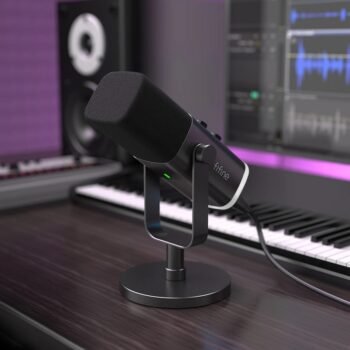
A reliable USB Mic for Gamers and Creators provides an easy way to improve your audio without building a complicated studio setup. With flexible connectivity, focused voice pickup, real-time monitoring, convenient controls, and customizable RGB lighting, the right microphone can become an important part of your gaming or content creation setup.
A modern RGB microphone can combine practical audio features with a stylish design, making it suitable for gaming, streaming, podcasting, voice recording, and online communication.
Why Audio Quality Matters for Gamers and Creators
When you’re streaming, recording a podcast, making YouTube videos, or communicating with teammates, your voice is one of the most important parts of your content.
A microphone with a focused pickup pattern can help your voice stand out while minimizing sounds coming from other directions. This is particularly useful when you’re recording at home, where keyboards, fans, conversations, and other sounds can easily become part of your recording.
This microphone uses a cardioid polar pattern, which is designed to capture sound primarily from the front while reducing sound pickup from the sides and rear. This makes it suitable for desktop recording, gaming, streaming, and spoken-word content.
Clear audio also makes your content easier to follow. Whether you’re explaining something during a tutorial or reacting to an intense gaming moment, good voice capture helps your audience concentrate on what you’re saying.
USB and XLR Connectivity for a Flexible Setup
One of the key features of this USB microphone for streaming is its USB and XLR dual output.
USB connectivity offers a straightforward way to connect the microphone to a compatible setup, making it practical for creators who want to keep their equipment simple.
For users with more advanced audio equipment, the XLR connection provides another option for integrating the microphone into an audio interface or other compatible equipment.
This flexibility means you can use the microphone with a simpler setup today while keeping the option to expand your audio system in the future.
Compared with a microphone that only supports one connection type, USB and XLR compatibility gives creators more freedom when building or upgrading their workspace.
RGB Lighting That Complements Your Setup
For gamers and streamers, a microphone can be more than an audio device. It can also become part of the overall appearance of the desk.
This RGB USB microphone features 10 dynamic RGB lighting modes, allowing you to customize the look of your setup.
You can choose different lighting effects depending on your gaming environment, room lighting, or personal preference. If your keyboard, mouse, PC case, or other accessories already feature RGB lighting, the microphone can complement the rest of your setup.
RGB lighting can also add visual interest when your gaming desk appears on camera during a livestream or video recording.
Real-Time Headphone Monitoring
Monitoring your voice while recording is an important feature for streamers and content creators.
The microphone includes a 3.5 mm headphone jack, allowing you to monitor your audio directly through headphones.
Instead of waiting until after a recording to discover that your voice was too quiet or too loud, real-time monitoring lets you listen while you speak.
This can be particularly useful during live streams, podcasts, and voice recordings where audio problems can be difficult to correct afterward.
Headphone monitoring can also help you maintain a more consistent speaking volume throughout a recording session.
Convenient Microphone and Headphone Controls
Audio adjustments don’t always need to be made through software.
This microphone features separate dials for microphone and headphone volume, allowing you to make quick adjustments directly from the device.
For example, if your voice becomes too loud during an energetic gaming session, you can adjust the microphone volume without interrupting your workflow.
The same applies to headphone volume. Having physical controls within easy reach makes the microphone more convenient for gaming, streaming, and recording.
Touch Mute for Quick Audio Control
Live creators sometimes need to mute their microphone immediately.
You may need to cough, speak to someone nearby, answer a phone call, or discuss something privately while streaming.
The built-in touch mute button provides a quick way to mute the microphone without having to open another application or search through software controls.
For streamers and gamers, this simple feature can be especially useful because everything happens quickly during a live session.
A Practical Microphone for Gaming
A good gaming USB microphone should provide both clear communication and convenient controls.
Whether you’re talking with teammates through Discord or streaming your gameplay, your voice needs to remain easy to understand.
The cardioid pickup pattern helps focus the microphone toward the person speaking, while the dedicated volume controls and headphone monitoring give you greater control over the audio experience.
The RGB lighting also makes the microphone a natural addition to a gaming desk.
It can work with minimalist setups as well as more colorful RGB gaming environments.
Suitable for Streaming and Content Creation
A USB Microphone for Streaming should be easy to integrate into your existing workflow.
This type of microphone can be useful for many different applications, including:
- Gaming streams
- YouTube videos
- Podcasts
- Voice recordings
- Live commentary
- Tutorials
- Gaming communication
- Online meetings and conversations
- Home recording
- General content creation
The combination of USB and XLR connectivity also gives creators more flexibility as their equipment and recording requirements change.
More Than Just a Gaming Microphone
Although RGB microphones are particularly popular with gamers, their usefulness extends beyond gaming.
Podcasters can benefit from the cardioid pickup pattern and headphone monitoring. YouTubers can use a dedicated microphone for tutorials, reviews, and commentary. Voice creators can also use the microphone for spoken-word recordings and other desktop applications.
The ability to monitor your voice and control volume directly from the microphone makes it practical for creators who regularly record audio.
You don’t necessarily need a professional studio to improve your voice recordings. A well-positioned desktop microphone can become the central audio component of a simple home recording setup.
Flexible Mounting Options
Workspace configuration varies from one creator to another.
Some users prefer keeping their microphone on a desktop stand, while others prefer a boom arm to save desk space and position the microphone closer to their mouth.
This microphone supports 3/8-inch and 5/8-inch mounts, allowing it to work with compatible microphone stands and boom-arm setups.
This mounting flexibility makes it easier to adjust the microphone as your workspace evolves.
For streamers using multiple monitors, keyboards, controllers, and other equipment, a boom-arm setup can also help keep the desk more organized.
Key Features at a Glance
Here are the main features to consider when choosing this microphone:
- USB and XLR dual outputs for flexible connectivity.
- Cardioid polar pattern for focused voice pickup.
- 10 dynamic RGB lighting modes for a customizable gaming setup.
- 3.5 mm headphone jack for real-time monitoring.
- Separate microphone and headphone volume controls.
- Touch mute button for quick audio control.
- 3/8-inch and 5/8-inch mount compatibility.
- Suitable for gaming, streaming, podcasting, recording, and online communication.
Who Should Use This RGB USB Microphone?
Gamers
Gamers who regularly communicate with teammates or stream gameplay can benefit from dedicated microphone controls, headphone monitoring, and focused voice pickup.
Streamers
Streamers can combine the microphone’s audio features with RGB lighting to create a more visually consistent gaming or streaming setup.
Podcasters
The cardioid pickup pattern and headphone monitoring make it suitable for spoken-word recording from a desktop environment.
Content Creators
YouTubers, reviewers, educators, and other creators can use a dedicated microphone for tutorials, commentary, product videos, and voice recording.
Beginners Building a Home Studio
The USB connection provides a simple starting point, while XLR connectivity gives users the option to move toward a more advanced audio setup later.
USB Mic vs. Built-In Computer Microphone
Most laptops and computers already have built-in microphones, but a dedicated microphone gives you greater control over your recording setup.
A desktop microphone can be positioned closer to your voice and placed in a more suitable direction. Features such as cardioid pickup, physical volume controls, headphone monitoring, and touch mute also provide functionality that isn’t normally available with a basic built-in microphone.
For people who frequently stream, record videos, podcast, or communicate online, upgrading to a dedicated USB Mic for Gamers and Creators can be a practical improvement.
How to Get Better Results From Your Microphone
The microphone is only one part of getting good audio. Proper positioning is also important.
Place the microphone in front of you and avoid positioning it directly beside noisy equipment whenever possible. Try to maintain a consistent distance while speaking.
Using headphones for monitoring can help you notice volume issues during recording rather than afterward.
Before starting a livestream, test your microphone level and make sure your voice can be heard clearly alongside game audio or other sounds.
Small adjustments to microphone position, distance, and volume can make a noticeable difference in the final result.
Build a Better Gaming and Creator Setup
A microphone is only one component of a modern gaming or content creation workspace.
You can combine it with a quality headset, gaming keyboard, mouse, monitor, lighting, and other accessories to create a setup designed around the way you work and play.
With its RGB lighting, the microphone can also contribute to the visual appearance of your desk while serving an important audio function.
For creators who regularly appear on camera, these small visual details can help create a more recognizable workspace and consistent presentation.
Final Thoughts
The right microphone can improve both your gaming experience and the quality of your content.
A USB Mic for Gamers and Creators with USB and XLR connectivity, a cardioid pickup pattern, 10 dynamic RGB lighting modes, real-time headphone monitoring, physical volume controls, and a touch mute function provides a flexible solution for gaming, streaming, podcasting, and recording.
Its combination of audio-focused features and RGB styling makes it suitable for creators who want practical controls without sacrificing the appearance of their setup.
If you’re looking to upgrade your gaming or content creation workspace, consider a microphone that gives you the connectivity, monitoring, controls, and design features that match your needs.
Frequently Asked Questions
Is this microphone good for gaming?
Yes. The cardioid pickup pattern, headphone monitoring, volume controls, and touch mute function make it suitable for gaming, communication, and streaming.
Does the microphone support both USB and XLR?
Yes. It features both USB and XLR outputs, giving you flexibility when connecting it to different compatible audio setups.
Does it have RGB lighting?
Yes. The microphone features 10 dynamic RGB lighting modes that can be used to customize the appearance of your gaming or streaming setup.
Can I monitor my voice while recording?
Yes. A built-in 3.5 mm headphone jack allows you to monitor your audio in real time while recording or streaming.
Does it have a mute button?
Yes. The microphone features a touch mute button for quickly muting the microphone when needed.
Can it be mounted on a microphone arm?
Yes. It supports both 3/8-inch and 5/8-inch mounts, making it compatible with suitable microphone stands and boom-arm setups.